Vol. II — Across the Language
MochiTranslate icon — a mochi character with English / kanji text

MochiTranslate

Spot-translatethe panel that’s blocking you.

A Chrome extension for the manga panels you can’t read. Hover any manga, manhwa or manhua image — click translate — get English back in the bubble, in the same hand. Built for spot use, not whole chapters. Bring your own Gemini key; cached re-reads stay free.

Chrome · Brave · Edge · Arc  ·  $19 once  ·  Lifetime

Click translate. Watch the bubble swap.

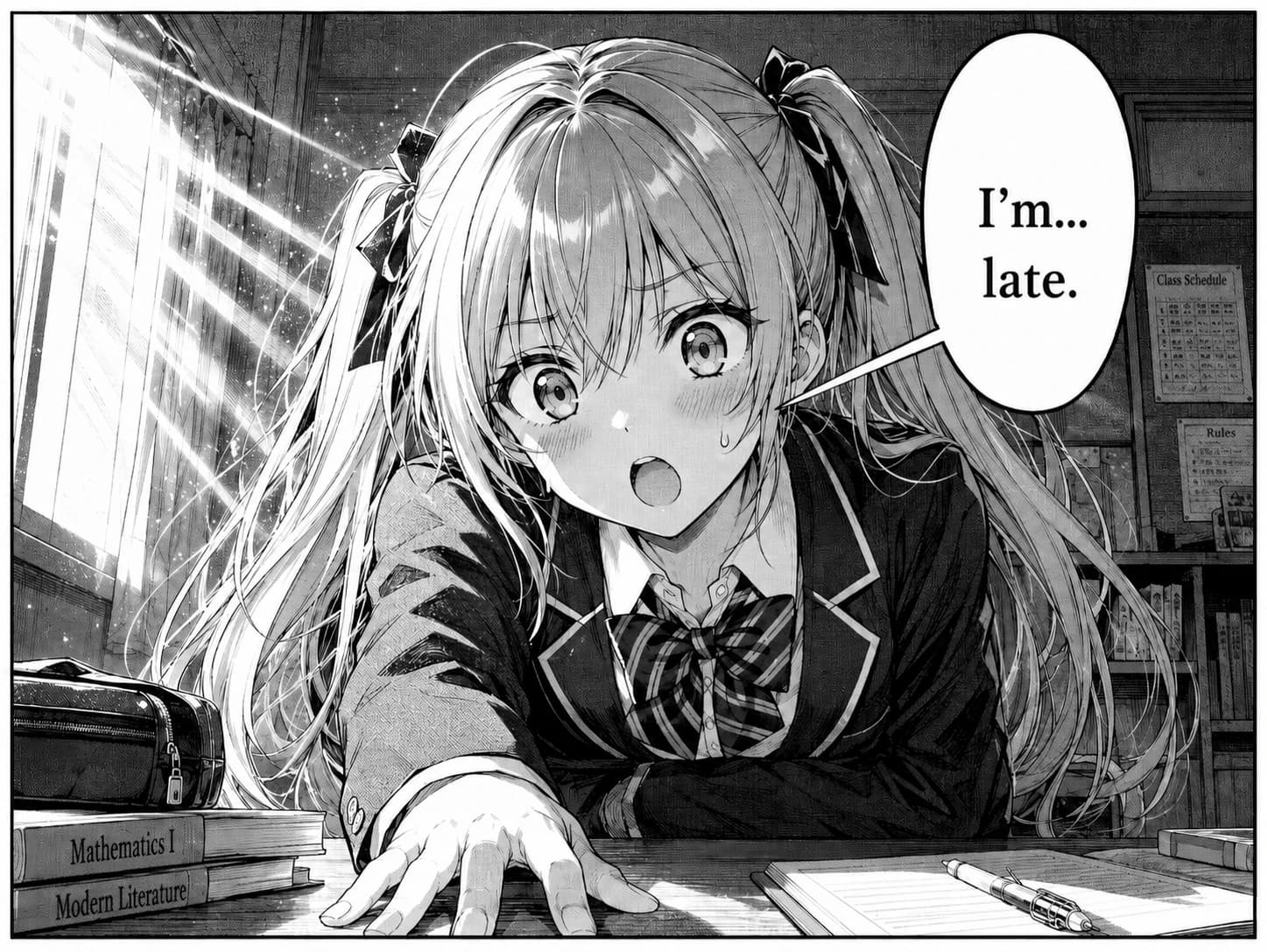
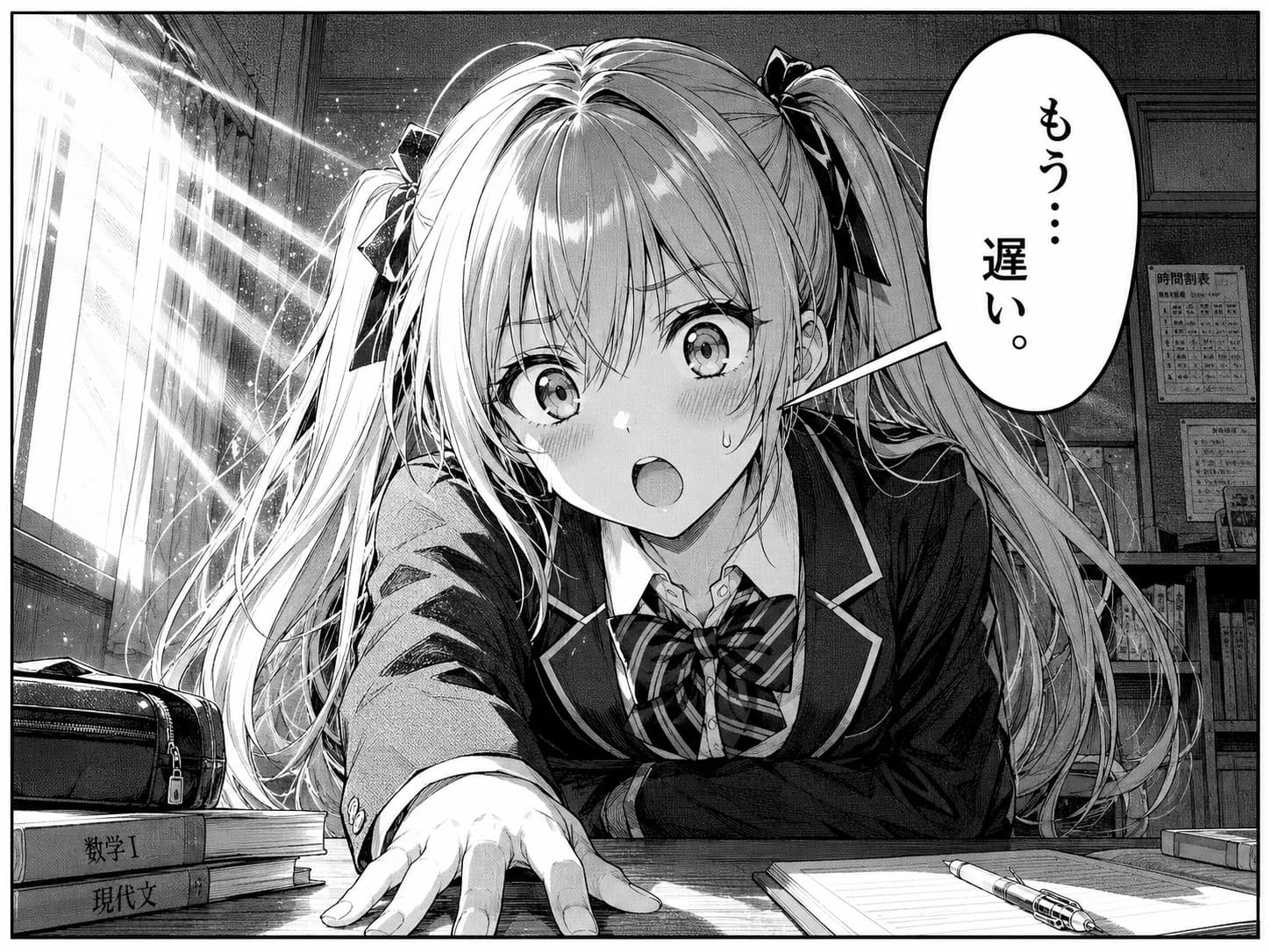
This isn’t a screenshot — it’s a synthetic manga panel rendered in your browser. The bubble swap mirrors what MochiTranslate actually does on a real raw chapter: read the source bubble, translate, render English back into the panel.

Click translate · or watch it cycle

Both versions of each panel were rendered by Gemini’s image-edit model — the same model MochiTranslate uses in production. The demo isn’t a mockup, it’s a literal sample of the output.

A manga translator that respects the artwork.

You’re reading raws. Maybe the official English translation is six weeks behind. Maybe the series never got licensed. You don’t want to wait, and you don’t want to squint at a Google Translate overlay covering half the page.

MochiTranslate sees a manga page the way a translator does: first it finds the speech bubbles and sound-effect text, then it considers each one as a connected unit, then it renders English back into that exact bubble. The artwork underneath stays the artwork.

It pairs naturally with MochiDim for late-night raw reading — same studio, same one-time pricing, same no-tracking philosophy.

Bubble-aware AI translation, not OCR overlay.

MochiTranslate uses vision-capable LLMs and per-bubble prompting to produce translations that read like a person wrote them — and renders the output back into the manga panel instead of pasting it as a tooltip.

Spot-translate, not auto-translate

MochiTranslate is built for the panel you can't read — not the chapter you're already reading. Hover any image, click translate, get English back in the bubble. Tap only what you need, no whole-chapter batch processing.

Bubble-aware, not OCR dump

Most translator extensions OCR the whole image and overlay a wall of text. MochiTranslate detects speech bubbles and panel boundaries first, so each bubble becomes its own translation unit — preserving who is speaking.

English rendered into the panel

Translated text is typed back into the original bubble in a font that matches the artwork style. No floating overlay covering the art, no popup tooltip you have to hover.

Cached re-reads stay free

Translations are cached per-image on your device. Re-open a chapter from last week, scroll back to a page you already translated, switch tabs and come back — none of it costs you another API call. Only fresh panels hit Gemini.

Bring your own Gemini key

Gemini's image-edit model is the one model right now that reliably re-renders manga bubbles back into the panel. Each translation is a few cents on your own Gemini key, paid directly to Google — no markup, no proxy, no per-call subscription.

Japanese, Korean, Chinese — tone preserved

Source language auto-detected per page. Casual, formal, polite, sound effects — MochiTranslate prompts the model with bubble context so a samurai doesn't sound like a startup founder.

Tuned for manga sites — works on any image.

MochiTranslate ships with hand-tuned support for the most popular manga, manhwa and webtoon readers below — and runs on every other site too. The underlying engine is a vision-capable LLM, so it translates any image containing text: foreign-language doujinshi and fan works, Pixiv captions, light-novel covers, screenshotted tweets in Japanese / Korean / Chinese, JRPG and visual-novel screenshots, foreign news stills, even product labels in shopping pages. Hover any <img> ≥ 200px and the translate button shows up.

  • MangaDexmangadex.org
  • Webtoonswebtoons.com
  • MangaPlusmangaplus.shueisha.co.jp
  • Comickcomick.io
  • Bato.tobato.to
  • Asuraasuracomic.net
  • Cubaricubari.moe
  • Tapastapas.io

+ Pixiv, Twitter / X, Reddit, any site where you read images with foreign-language text.

Install, key, read, translate.

  1. Install from the Chrome Web Store

    10 seconds. Works in any Chromium browser — Chrome, Brave, Edge, Arc.

  2. Pay $19 once via Polar

    Secure checkout. Lifetime license. License key arrives by email. (Same price as MochiDim — bundle both with the Studio Pass for $30.)

  3. Paste your Gemini key

    Google AI Studio key (image-edit model), set once. Stays in chrome.storage on your device.

  4. Hover a panel, hit translate

    Click the 🌐 on any image you can't read. English re-renders back into the bubble. Cached re-reads are free.

One price. Lifetime.

BYO AI key — no markup
$19once

Lifetime license · all future MochiTranslate updates included

  • Spot-translate any panel — JP, KR, ZH manga
  • Bubble-aware AI rendering back into the panel
  • Bring your own Gemini key — pay Google directly, no markup
  • Cached re-reads stay free — only fresh panels hit Gemini
  • Works on every Chromium browser you use
  • Free updates forever · 30-day no-questions refund
Buy MochiTranslate — $19

Secure checkout via Polar.sh · Visa, Mastercard, Apple Pay

Already paid? Re-activate your key →

Questions worth asking about MochiTranslate.

Q.01How is MochiTranslate different from Google Translate or DeepL extensions?

+

Google Translate and DeepL browser extensions translate selected text or the page's HTML body. They can't read the text inside a manga image — manga speech bubbles are pixels, not characters. MochiTranslate uses vision-capable AI models to read the bubbles directly and then renders English back into the panel, preserving layout.

Q.02What languages does MochiTranslate translate?

+

Japanese, Korean and Chinese into English at launch. Additional source-target pairs will be added based on demand. The underlying model handles many language pairs — we're rolling out UI for them over time.

Q.03Do I need an AI API key?

+

Yes. MochiTranslate uses your own Gemini API key — specifically Gemini's image-edit model (the only model right now that reliably re-renders manga bubbles back into the panel). Set it once in the extension settings; Google bills your account directly. No markup, no proxy, no per-call subscription on top.

Q.04Roughly how much does the AI usage cost?

+

MochiTranslate is built for spot translation, not whole-chapter batch processing. Each panel you translate costs a few cents on your own Gemini key (paid directly to Google — we don't proxy or take a cut). Cached re-reads stay free forever, so re-opening a chapter you already translated never costs you twice. Tap only the panels you can't read.

Q.05Does MochiTranslate work on Webtoons and manhwa sites?

+

Yes. MochiTranslate handles vertical-scroll webtoon strips (Korean manhwa, Chinese manhua) as well as traditional two-page manga layouts. It pairs naturally with MochiDim — many users install both.

Q.06Is the $19 really one-time?

+

Yes. One payment, lifetime license, works on every Chromium browser you sign into (Chrome, Brave, Edge, Arc). All future MochiTranslate updates are included forever. The only ongoing cost is your own Gemini API usage, paid directly to Google.

Q.07Does MochiTranslate collect my reading data?

+

No. The extension is local-first: your Gemini key, settings and translation cache all live in chrome.storage on your device. License validation makes one network call to Polar.sh. Translation requests go directly from your browser to Google's Gemini API — we don't proxy or log them.

Q.08What's the refund policy?

+

30 days, no questions, no forms. Email hello@mochipanel.com from the address you used at checkout and we'll refund through Polar and revoke the license.

Q.09Will MochiTranslate work alongside MochiDim?

+

Yes, by design. They don't conflict — MochiDim warms the image layer, MochiTranslate replaces bubble text. Installed together, they make raw chapters readable and easy on the eyes at the same time.

Q.10Does MochiTranslate work on Firefox or Safari?

+

Currently MochiTranslate ships for Chromium browsers (Chrome, Brave, Edge, Arc). A Firefox build is on the roadmap. Safari has a different extension model and isn't yet planned.

Still stuck? Email hello@mochipanel.com.

Tap the panel. Get English. Move on.

Install MochiTranslate. Spot-translate any manga panel — your Gemini key, your pace, cached re-reads free.